currency_converter
Currency Converter App
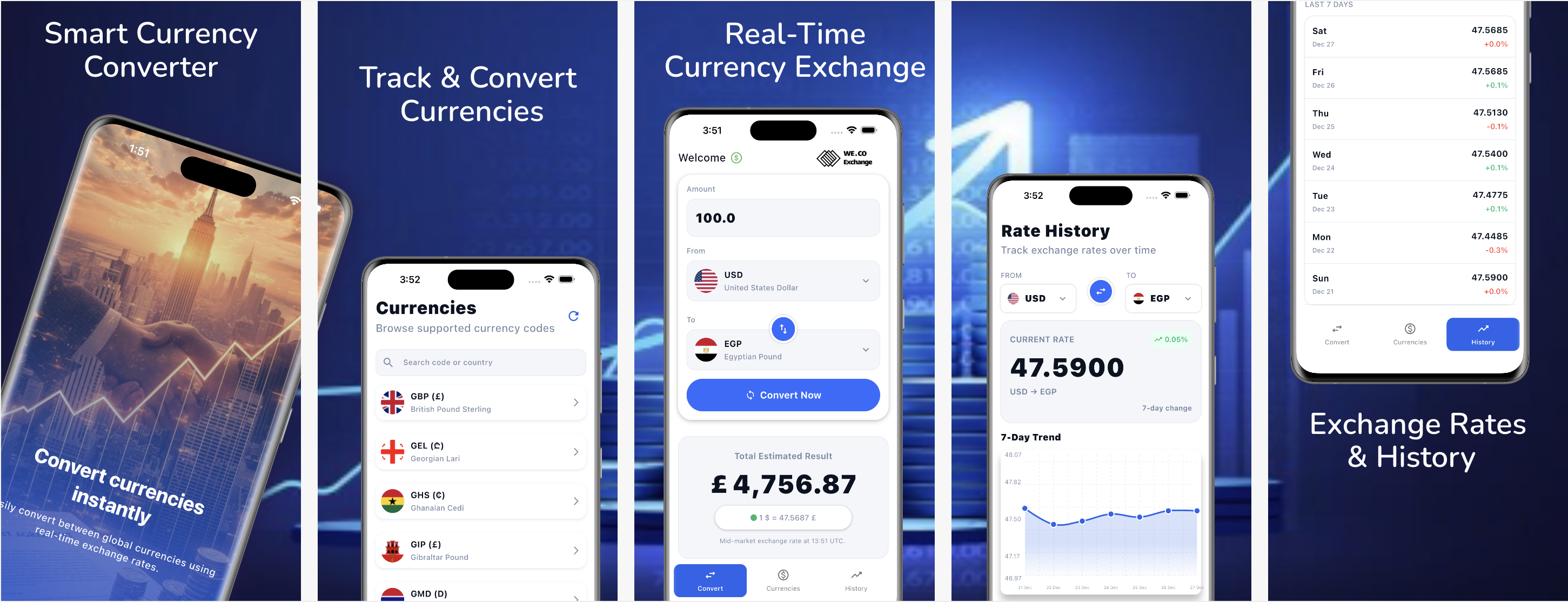
A modern Flutter application for currency conversion with real-time exchange rates, historical data visualization, and offline support.



📱 Screenshots
📥 Download APK
Download the latest release APK directly:

Direct Link: Download APK
Note: Make sure to enable “Install from Unknown Sources” in your Android settings before installing the APK.
🔗 Repository
GitHub: https://github.com/mohamedbasha275/currency_converter
📋 Table of Contents
- Screenshots
- Download APK
- Repository
- Build Instructions
- Architecture Pattern
- Image Loader Library
- Database
- Project Structure
- Dependencies
- Future Features
- Testing
- Notes
🚀 Build Instructions
Prerequisites
Before building the project, ensure you have the following installed:
- Flutter SDK: Version 3.9.2 or higher
- Dart SDK: Included with Flutter
- Android Studio or VS Code with Flutter extensions
- Xcode (for iOS development on macOS)
- Android SDK (for Android development)
Setup Steps
- Clone the repository
git clone https://github.com/mohamedbasha275/currency_converter.git cd currency_converter - Install dependencies
flutter pub get - Generate native assets and icons
flutter pub run flutter_launcher_icons flutter pub run flutter_native_splash:create -
Run the app
For Android:
flutter runFor iOS (macOS only):
flutter run -d ios - Build release APK (Android)
flutter build apk --release - Build release IPA (iOS)
flutter build ios --release
Additional Notes
- The app requires an internet connection for fetching real-time exchange rates
- Minimum Android SDK: 21 (Android 5.0 Lollipop)
- The app uses native splash screens and launcher icons configured in
pubspec.yaml
🏗️ Architecture Pattern
Clean Architecture with BLoC Pattern
This application follows Clean Architecture principles combined with the BLoC (Business Logic Component) pattern for state management.
Architecture Layers
The project is organized into three main layers:
- Presentation Layer (
presentation/)- UI components (Screens, Widgets)
- State management using BLoC/Cubit
- User interactions and UI logic
- Domain Layer (
domain/)- Business logic and use cases
- Repository interfaces (contracts)
- Entity models
- Independent of external frameworks
- Data Layer (
data/)- Data sources (Remote API, Local Database)
- Repository implementations
- Data models and DTOs
- External dependencies
Project Structure Example
lib/features/currency_converter/
├── data/
│   ├── datasources/          # API and local data sources
│   └── repositories/          # Repository implementations
├── domain/
│   ├── repositories/          # Repository interfaces
│   └── use_cases/             # Business logic use cases
└── presentation/
    ├── manager/               # BLoC/Cubit state management
    ├── screens/               # Full screen widgets
    └── widgets/               # Reusable UI components
Justification for Clean Architecture
- Separation of Concerns
- Each layer has a single, well-defined responsibility
- Business logic is isolated from UI and data sources
- Easy to understand and maintain
- Testability
- Domain layer can be tested independently without UI or database
- Use cases can be unit tested with mock repositories
- Data layer can be tested separately from business logic
- Independence
- Domain layer doesn’t depend on Flutter or external libraries
- Business rules remain unchanged when UI or data sources change
- Framework-agnostic core logic
- Scalability
- Easy to add new features following the same pattern
- Clear boundaries between layers prevent code coupling
- Supports team collaboration with clear module boundaries
- Maintainability
- Changes in one layer don’t affect others
- Easy to locate and fix bugs
- Code is self-documenting through structure
Justification for BLoC Pattern
- Reactive Programming
- Stream-based state management provides reactive UI updates
- Handles asynchronous operations elegantly
- Separation of Business Logic from UI
- UI components are pure and testable
- Business logic is centralized in BLoC/Cubit classes
- Predictable State Management
- Unidirectional data flow
- Easy to debug with BLoC observer
- State changes are traceable
- Flutter Ecosystem Integration
- Well-supported by Flutter team
- Extensive community and resources
- Works seamlessly with dependency injection (GetIt)
Dependency Injection
The project uses GetIt for dependency injection, which provides:
- Loose Coupling: Components depend on abstractions, not concrete implementations
- Testability: Easy to swap implementations with mocks for testing
- Singleton Management: Efficient resource management
- Service Locator Pattern: Centralized dependency registration
🖼️ Image Loader Library
Cached Network Image (cached_network_image: ^3.3.1)
The application uses Cached Network Image for loading and caching currency flag images from network URLs.
Usage in the Project
The library is primarily used in the CurrencyFlag widget to display country flags:
CachedNetworkImage(
  imageUrl: url,
  width: size,
  height: size,
  memCacheWidth: 100,
  fit: BoxFit.cover,
  placeholder: (_, __) => Icon(Icons.flag_circle),
  errorWidget: (_, __, ___) => Icon(Icons.flag_circle),
)
Justification for Choosing Cached Network Image
- Automatic Caching
- Images are automatically cached to disk and memory
- Reduces network requests and improves performance
- Works offline after initial load
- Memory Optimization
- Built-in memory cache management
- Configurable cache size limits
- Prevents memory leaks and excessive memory usage
- Performance Benefits
- Fast image loading from cache
- Reduces bandwidth consumption
- Improves app responsiveness
- User Experience
- Placeholder widgets while loading
- Error handling with fallback widgets
- Smooth fade-in animations (configurable)
- No flickering on image reloads
- Ease of Use
- Simple API similar to Flutter’s
Image.network - Drop-in replacement with additional features
- Well-documented and maintained
- Simple API similar to Flutter’s
- Production Ready
- Widely used in production Flutter apps
- Actively maintained with regular updates
- Handles edge cases (network errors, invalid URLs, etc.)
- Memory Cache Configuration
- Supports
memCacheWidthandmemCacheHeightfor memory optimization - Reduces memory footprint for large images
- Essential for apps displaying many images (currency flags list)
- Supports
💾 Database
SQLite with sqflite (sqflite: ^2.3.0)
The application uses sqflite (SQLite for Flutter) as the primary local database solution.
Usage in the Project
The database is used to store currency information locally:
- Table:
currencies - Fields:
id,code,name,symbol,flagUrl,createdAt - Purpose: Offline access to currency list, faster loading, reduced API calls
Database Helper Implementation
The project includes a CurrencyDatabaseHelper singleton class that manages:
- Database initialization
- CRUD operations for currencies
- Search functionality
- Batch insert operations for performance
Justification for Choosing sqflite
- Native SQLite Integration
- Direct access to SQLite database engine
- Full SQL support for complex queries
- High performance for relational data
- Offline Support
- Currency list available without internet connection
- Improves user experience in low-connectivity scenarios
- Reduces dependency on API availability
- Performance
- Fast read/write operations
- Efficient batch operations
- Indexed queries for quick searches
- Suitable for large datasets
- Data Persistence
- Data survives app restarts
- Reliable storage for critical app data
- No data loss on app updates
- Flexibility
- Supports complex queries (JOIN, WHERE, ORDER BY)
- Easy to add new tables and relationships
- Migration support for schema changes
- Flutter Ecosystem
- Official Flutter plugin
- Well-maintained and stable
- Extensive documentation and community support
- Production Ready
- Used by thousands of Flutter apps
- Battle-tested in production environments
- Regular security and performance updates
Shared Preferences (shared_preferences: ^2.5.4)
The application also uses Shared Preferences for simple key-value storage.
Usage in the Project
Shared Preferences is used for:
- Storing onboarding screen viewed status
- Simple app settings and user preferences
- Lightweight configuration data
Justification for Using Shared Preferences
- Simplicity
- Perfect for simple key-value pairs
- No need for complex database setup
- Easy to use API
- Performance
- Faster than database for simple data
- Minimal overhead for small data
- Synchronous read operations
- Appropriate Use Case
- Ideal for boolean flags (onboarding status)
- Suitable for user preferences
- Not overkill for simple settings
- Platform Native
- Uses native storage mechanisms (NSUserDefaults on iOS, SharedPreferences on Android)
- Reliable and platform-optimized
Combined Database Strategy
The project uses a hybrid approach:
- sqflite: For structured, relational data (currency list with multiple fields)
- Shared Preferences: For simple settings and flags
This approach provides:
- Optimal performance for each use case
- Right tool for the right job
- Efficient resource utilization
- Maintainable codebase
📁 Project Structure
lib/
├── app_widgets/              # Shared app-wide widgets
├── common/                   # Common UI components
├── core/                     # Core functionality
│   ├── bloc_observer/        # BLoC observer for debugging
│   ├── di/                   # Dependency injection (GetIt)
│   ├── errors/               # Error handling
│   ├── extension/            # Dart extensions
│   ├── helper_functions/     # Utility functions
│   ├── navigation/           # Routing and navigation
│   ├── resources/            # App constants, colors, themes
│   ├── shared_preferences/   # SharedPreferences wrapper
│   └── use_cases/            # Base use case class
├── features/                 # Feature modules
│   ├── currency_converter/   # Currency conversion feature
│   ├── currency_list/        # Currency list feature
│   ├── historical_rates/     # Historical rates feature
│   ├── onboarding/          # Onboarding screens
│   └── home_screen.dart     # Main home screen
├── main.dart                 # App entry point
└── main_helper.dart         # App initialization helpers
📦 Key Dependencies
State Management
bloc: ^9.1.0- BLoC pattern implementationflutter_bloc: ^9.1.0- Flutter BLoC integration
Dependency Injection
get_it: ^8.0.0- Service locator and dependency injection
Networking
dio: ^5.9.0- HTTP client for API calls
Database & Storage
sqflite: ^2.3.0- SQLite databaseshared_preferences: ^2.5.4- Key-value storage
Image Loading
cached_network_image: ^3.3.1- Network image caching
UI & Utilities
flutter_screenutil: ^5.9.0- Responsive UI sizingfl_chart: ^0.66.0- Charts for historical ratesintl: ^0.19.0- Internationalization and formattingflutter_hooks: ^0.21.3+1- Flutter hooks for stateful logic
Error Handling
dartz: ^0.10.1- Functional programming (Either for error handling)
Testing
mocktail: ^1.0.4- Mocking frameworkbloc_test: ^10.0.0- BLoC testing utilities
🔮 Future Enhancements (Optional – Time Permitting)
The following features are optional enhancements and are not required for the core functionality of the task. They are listed to demonstrate the app’s scalability and future potential if additional time is available.
🌙 Dark Mode
- Full dark theme support
- Manual toggle and system-based theme switching
- Improves usability and accessibility
🌍 Internationalization (i18n)
- Multi-language support (Arabic, English, etc.)
- RTL support for Arabic
- Dynamic language switching
🧪 Widget Tests & Integration Tests
- Widget tests for UI components
- Integration tests for critical user flows
- Improves code reliability and maintainability
💰 Cryptocurrency Support
- Support for major cryptocurrencies (BTC, ETH, etc.)
- Real-time crypto exchange rates
- Fiat ↔ Crypto conversion
⭐ Favorite Currencies
- Allow users to mark currencies as favorites
- Persistent storage of user preferences
- Quick access to frequently used currencies
📊 Currency Tracking (Monthly / Yearly)
- Track currency performance by month and year
- Trend visualization using charts
- Custom date range analysis
📝 Note
These enhancements are intentionally separated from the main scope of the task. Thanks to the use of Clean Architecture and BLoC, these features can be added incrementally without impacting the existing implementation.
📝 Notes
- The app follows Flutter best practices and Material Design guidelines
- All features are organized using Clean Architecture principles
- The codebase is fully testable with comprehensive test coverage
- Error handling is implemented using the Either pattern from
dartz - The app supports offline functionality through local database caching
🧪 Testing
The project includes comprehensive unit tests covering all layers of the application. For detailed testing documentation, see:
Quick Test Commands
# Run all tests
flutter test

# Run tests with coverage
flutter test --coverage

# Run tests for a specific feature
flutter test test/features/currency_converter/
Test Coverage
- ✅ Data Sources: API calls, error handling, data transformation
- ✅ Repositories: Error mapping, data flow, exception handling
- ✅ Use Cases: Business logic, parameter validation, error propagation
- ✅ Cubits: State management, user interactions, state transitions
👨💻 Development
For development guidelines and contribution instructions, please refer to the project’s development documentation.
📄 License
This project is open source and available for educational purposes.
Built with ❤️ using Flutter
Repository: https://github.com/mohamedbasha275/currency_converter